OpenClaw 部署文档
OpenClaw基础信息
架构描述
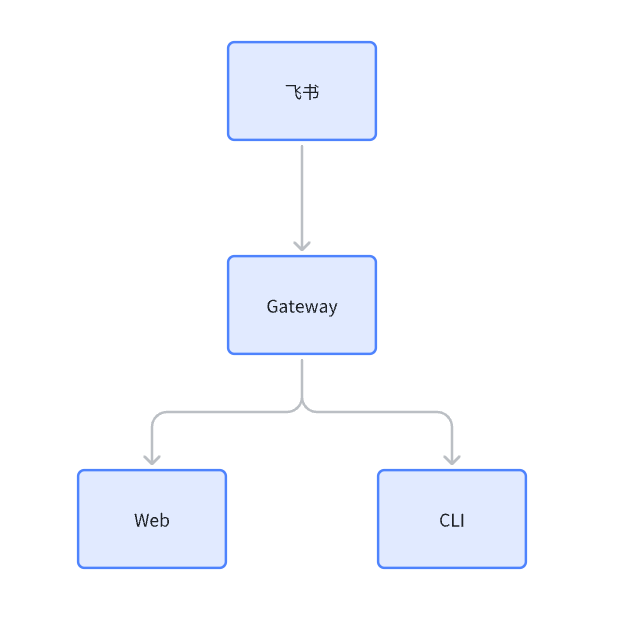
OpenClaw的核心架构为Gateway,通过Gateway承接Web、CLI等客户端的请求,向上对接例如飞书、Whats App等工具,实现AI智能体的相关功能
部署安装
通过CLI部署
此安装方式为交互式安装,可以根据需要对安装内容进行点选
curl -fsSL https://openclaw.ai/install.sh | bash
通过Docker部署
下载OpenClaw原代码
git clone https://github.com/openclaw/openclaw.git
修改Docker Compose文件
-
构建Docker镜像
docker build -t openclaw:local -f Dockerfile . -
编辑docker-compose.yml
vim docker-compose.yml -
编辑相应参数
在yml的文件中使用${xxx}的参数,可以通过在系统中设定环境变量的方式进行修改,也可以通过编辑yml来进行修改
services: openclaw-gateway: image: ${OPENCLAW_IMAGE:-openclaw:local} # 镜像ID environment: HOME: /home/node TERM: xterm-256color OPENCLAW_GATEWAY_TOKEN: ${OPENCLAW_GATEWAY_TOKEN} # 设定的Token CLAUDE_AI_SESSION_KEY: ${CLAUDE_AI_SESSION_KEY} CLAUDE_WEB_SESSION_KEY: ${CLAUDE_WEB_SESSION_KEY} CLAUDE_WEB_COOKIE: ${CLAUDE_WEB_COOKIE} volumes: - ${OPENCLAW_CONFIG_DIR}:/home/node/.openclaw # 在.openclaw中配置openclaw.json - ${OPENCLAW_WORKSPACE_DIR}:/home/node/.openclaw/workspace ports: - "${OPENCLAW_GATEWAY_PORT:-18789}:18789" # 设定Web端口 - "${OPENCLAW_BRIDGE_PORT:-18790}:18790" init: true restart: unless-stopped command: ["node", "dist/index.js", "gateway", "--bind", "${OPENCLAW_GATEWAY_BIND:-lan}", "--port", "18789"] openclaw-cli: image: ${OPENCLAW_IMAGE:-openclaw:local} environment: HOME: /home/node TERM: xterm-256color OPENCLAW_GATEWAY_TOKEN: ${OPENCLAW_GATEWAY_TOKEN} BROWSER: echo CLAUDE_AI_SESSION_KEY: ${CLAUDE_AI_SESSION_KEY} CLAUDE_WEB_SESSION_KEY: ${CLAUDE_WEB_SESSION_KEY} CLAUDE_WEB_COOKIE: ${CLAUDE_WEB_COOKIE} volumes: - ${OPENCLAW_CONFIG_DIR}:/home/node/.openclaw - ${OPENCLAW_WORKSPACE_DIR}:/home/node/.openclaw/workspace stdin_open: true tty: true init: true entrypoint: ["node", "dist/index.js"] -
启动容器
docker compose run --rm openclaw-cli onboard
docker compose up -d openclaw-gateway
访问页面
页面地址为http://xx.xx.xx.xx:18789?token=xxx